
Awake on LAN0.9.5 - Get APK
You'll be able to download in few seconds.
Publisher Description
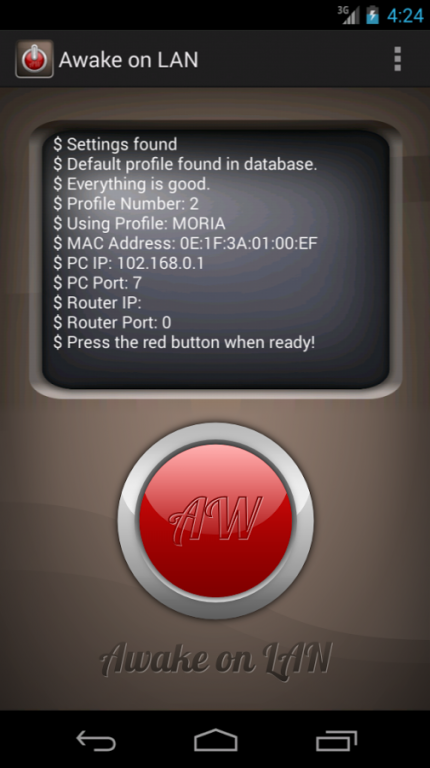
♥Awake on LAN♥ is a very simple, easy to use, and beautiful App that uses magic packets to wake up your computers from low power mode. Can turn on PC's on S5 state (Totally powered off).
I created this App for my computers, and decided to publish it so I made the interface much nicer just for you guys.
Anyway, to use Awake on LAN, you need to do the following:
I. BIOS settings:
1) Make sure your BIOS supports ACPI from PCI. You can go to your BIOS's"Power management" settings. Depending on your motherboard, this name may vary. So explore a bit.
2) Under the ACPI settings, make sure you set enable Wake Up from PCI device.
3) Also make sure that you set wake up level to "S" if you wish to turn on your PC from powered down state using this App.
S1-S4 can be set as well for waking the PC from different types of sleep or suspend states. Here is what they mean:
S1 = Suspend
S2-S3 = Sleep
S4 = Hibernate
S5 = Off
If available, you can try S5 settings if you want to power from off. But so far, most computers will have S1 and S3 and they may work too.
4) Save & exit.
II. Other settings if using windows:
If you are using windows, S5 may be the only thing working unless you configure your network adapter.
Here is how you can do it:
1) Go to: Control Panel > Network and Internet > Network Connections
2) Right click on your NIC and select Properties > configure > Power Management
3) Make sure "Allow this device to bring the computer out of standby" is checked
Depending on your network card, also check the advanced tab and play with "wake on magic packet" and similarly named settings.
III. App settings:
Enter MAC address of the computer you want to wake up and it's PC's IP.
If you are having problems, use the broadcast address of your network.
Optionally, you can change the Port to any available port you like. Ideally, port 7 and 9 is always available.
As an option, you can set the Router's IP in the App's Router IP box. If you are using things like Dynamic DNS, you can try using your dynamic domain name such as "exampe.no-ip.com" instead of your IP.
If both the router's IP and PC's IP are set, Awake on LAN will send the magic packet to both.
Depending on your router, you may or may not need to configure the router's Port Forwarding settings. Also, depending on your router, packets may or may not not reach the target computers.
IV. Router settings (If you are having problems or want to send through the internet):
Sometimes routers won't play well with wake-on-LAN packets.
If you are having troubles, you can try to use the router to forward the magic packet to your PC.
In your "port forward settings", forward port "7", or any custom port you have set in your App, to the PC's IP you want to wake up. That means you have to reserve IP addressed for your computers you want to wake up.
Save the settings and reboot the router.
Just to reiterate, some routers just won't play well with wake-on-LAN packets.
V. OTHER NOTES:
Typically, Awake on LAN and any Wake on LAN software will work only on wired Ethernet connections.
WiFi connected computers may not be compatible with Awake on LAN due to WiFi hardware limitations.
Some routers just won't play well with wake-on-LAN packets and many problems concerning wake-up packets are highly dependent on your hardware (router and PC lan card) unfortunately.
About Awake on LAN
The company that develops Awake on LAN is DesignSomniac. The latest version released by its developer is 0.9.5.
To install Awake on LAN on your Android device, just click the green Continue To App button above to start the installation process. The app is listed on our website since 2015-10-20 and was downloaded 0 times. We have already checked if the download link is safe, however for your own protection we recommend that you scan the downloaded app with your antivirus. Your antivirus may detect the Awake on LAN as malware as malware if the download link to com.designsomniac.awakeonlan is broken.
How to install Awake on LAN on your Android device:
- Click on the Continue To App button on our website. This will redirect you to Google Play.
- Once the Awake on LAN is shown in the Google Play listing of your Android device, you can start its download and installation. Tap on the Install button located below the search bar and to the right of the app icon.
- A pop-up window with the permissions required by Awake on LAN will be shown. Click on Accept to continue the process.
- Awake on LAN will be downloaded onto your device, displaying a progress. Once the download completes, the installation will start and you'll get a notification after the installation is finished.
Program Details
System requirements
Download information
Pricing
Version History
version 0.9.5
posted on 2015-10-20
Solves crashes (at least on my new phone) when trying to add or edit a profile. Still and will always be ad-free and the App is still ans will always be completely free.
Disclaimer
External Download
We do not host Awake on LAN on our servers. We did not scan it for viruses, adware, spyware or other type of malware. This app is hosted by Galad and passed their terms and conditions to be listed there. We recommend caution when installing it.
The APK Download link for Awake on LAN is provided to you by apps112.com without any warranties, representations or guarantees of any kind, so access it at your own risk.
If you have questions regarding this particular app contact the publisher directly. For questions about the functionalities of apps112.com contact us.
